Skillcept Online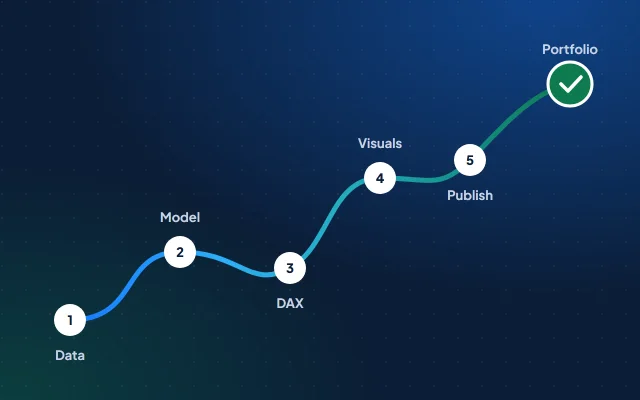
Key takeaways
- About 45 hours over 30 days takes a beginner from installing Power BI to a one-page dashboard they can explain: data, model, DAX, visuals, publishing and a write-up.
- PL-300 weighs preparing, modelling and visualising data at 25–30% each and managing and securing Power BI at 15–20%; you need 700 to pass (Microsoft Learn, skills as of 20 Apr 2026).1
- Power BI Desktop is free but needs Windows 10 or later, and publishing to the Power BI service needs a work or school email, not Gmail.23
- Power BI Developers earn ₹4.7–5.1 lakh a year with 1–3 years’ experience and ₹6.7–7.4 lakh with 3–6 years (AmbitionBox, 21 Oct 2026).4
Can you learn Power BI in 30 days?
Yes, well enough to build one solid dashboard and explain every number on it, which is what a portfolio needs. Getting job-ready also takes SQL and a couple more projects, and most people practise for a few more weeks before they book PL-300.
Power BI is Microsoft’s tool for turning data into interactive reports, and the free Power BI Desktop app is where you build them. You’ll use its two languages: Power Query, for cleaning and shaping data without code, and DAX (Data Analysis Expressions), for calculations.
| Stage | Days | About | You finish with |
|---|---|---|---|
| 1. Data | 1–7 | 10 hours | A clean price table, built in Power Query |
| 2. Model | 8–11 | 6 hours | A star schema with a date table |
| 3. DAX | 12–18 | 10 hours | Five measures you can explain |
| 4. Visuals | 19–24 | 9 hours | A one-page report that answers one question |
| 5. Publish | 25–26 | 3 hours | A PDF or link, and a two-minute walkthrough |
| 6. Portfolio | 27–30 | 6 hours | A GitHub project and your PL-300 plan |
About 45 hours: roughly 1.5 hours a day, or 10 hours a week.
The 30 days, step by step
Six stages, each ending in something you can show. Tick each step off as you finish it.
Days 1–7 · about 10 hours
Data: get it and clean it
Power Query records every cleaning step, so the same steps run again when the data refreshes.
Free: Get started with Microsoft data analytics · Prepare data for analysis with Power BIIn the program: Module 3
Days 8–11 · about 6 hours
Model: a star schema
A star schema puts one table of events, the facts, in the middle, joined to the tables that describe them.
Days 12–18 · about 10 hours
DAX: measures that answer questions
Write measures, not calculated columns, for anything you’ll add up or average. The code is further down this page.
Free: Write DAX formulas · Use DAX time intelligence functions
Days 19–24 · about 9 hours
Visuals: one page, one question
Sketch the page on paper first: the question at the top, three numbers, one trend, one comparison.
Days 25–26 · about 3 hours
Publish: share it safely
The Power BI service needs a work or school email, so plan for both cases.
Days 27–30 · about 6 hours
Portfolio, and a plan for PL-300
A recruiter skims your README; an interviewer asks why you built it that way. Prepare for both.
Free: PL-300 practice assessmentIn the program: PL-300, free on every plan
Your dataset: mandi prices
Build on daily wholesale prices from India’s mandis: data an Indian interviewer understands at once, messy enough to show real cleaning, and openly licensed.
The file is data.gov.in’s Variety-wise Daily Market Prices Data of Commodity, from the Directorate of Marketing and Inspection, generated through the Agmarknet portal and updated on 21 October 2026 when we checked. Each row has a state, district, market, commodity, variety and grade, the arrival date, and the minimum, maximum and modal (most common) price.5 It’s published under the Government Open Data License – India: you may use, adapt and publish it, commercially too, as long as you credit the provider, the source and the licence.6
The question to answer: when do onion, tomato and potato prices jump in your state, and which markets pay the most? A retail chain’s buyer would use exactly that to decide where to source.
Check the date range in your download. You want at least three months, so month-on-month comparisons work; if yours is shorter, add a district or a busier market.
| Table | Columns |
|---|---|
| PricesFact | Arrival_Date, MarketKey, Commodity_Code, Variety, Min_Price, Max_Price, Modal_Price |
| DateDimension | Date, Year, Month, Month No |
| MarketDimension | MarketKey, Market, District, State |
| CommodityDimension | Commodity_Code, Commodity |
Dimension tables filter and group; the fact table holds the numbers you summarise, as Microsoft’s star-schema guidance puts it.7
Market names can repeat across districts, so build MarketKey from state, district and market together, or add an index column in Power Query, which Microsoft’s guidance suggests when a dimension has no single unique column.7
The model and the DAX
A date table and five measures answer every question above. Write them one at a time, and test each in a table visual before you chart it.
Date =
ADDCOLUMNS (
    CALENDAR ( MIN ( Prices[Arrival_Date] ), MAX ( Prices[Arrival_Date] ) ),
    "Year", YEAR ( [Date] ),
    "Month", FORMAT ( [Date], "mmm yyyy" ),
    "Month No", YEAR ( [Date] ) * 100 + MONTH ( [Date] )
)

Avg Modal Price = AVERAGE ( Prices[Modal_Price] )

Price Spread = AVERAGEX ( Prices, Prices[Max_Price] - Prices[Min_Price] )

Modal Price LM =
CALCULATE ( [Avg Modal Price], DATEADD ( 'Date'[Date], -1, MONTH ) )

MoM Change % =
DIVIDE ( [Avg Modal Price] - [Modal Price LM], [Modal Price LM] )

Modal Price 7D Avg =
AVERAGEX (
    DATESINPERIOD ( 'Date'[Date], MAX ( 'Date'[Date] ), -7, DAY ),
    [Avg Modal Price]
)- CALENDAR makes one row for every day between your first and last date. Sort Month by Month No, then mark the table as the date table, so time functions work.
- DATEADD shifts the dates in the current filter back a month, so Modal Price LM is last month’s average for whatever the slicers select.
- DIVIDE returns a blank instead of an error when there’s no earlier price to compare with.
- DATESINPERIOD takes the seven days up to each date, and AVERAGEX averages the daily prices across them, smoothing out one-day jumps.
In an interview, expect “why a measure and not a column?” and “what happens to this measure on a day with no arrivals?”. Have an answer for both.
Publish and show your work
Power BI Desktop is free and runs on Windows 10 or later.2 Publishing to the Power BI service is different: Microsoft says you need a work or school email account, and consumer addresses such as Gmail or Hotmail can’t be used directly.3 If you have a college or work account, publish to My workspace; if not, a PDF, screenshots and a short walkthrough video show the work just as well.
Be careful with Publish to web. Anyone on the internet can view the report without signing in, including detail-level data in the model that the report doesn’t display, and an administrator has to switch it on.8 Public government data is fine to share that way; anything from an employer or a client never is.
Put the .pbix file on GitHub with a README that tells the story. Credit the data in GODL-India’s attribution format: provider, year, name, repository, date, link and licence.6
# When do onion, tomato and potato prices jump in Maharashtra?
**Answer:** one sentence with the finding and a number.

## Data
Directorate of Marketing and Inspection, 2024, Variety-wise Daily Market
Prices Data of Commodity, Open Government Data Platform India, [dd/mm],
https://www.data.gov.in/resource/variety-wise-daily-market-prices-data-commodity.
Published under Government Open Data License - India: https://www.data.gov.in/Godl.
## Model
Prices (fact) with Date, Market and Commodity (dimensions).
## Measures
Average modal price, spread, last month, month-on-month change, 7-day average.
## Findings
Three bullets, each with a number.
## Limits
What the data can't tell you: arrivals, quality, retail prices.Want more projects in the same style? Our 15 data analyst projects on Indian public data include five Power BI-friendly ones.
PL-300, and what Power BI pays
PL-300 is the exam behind Microsoft’s Power BI Data Analyst Associate certification: 100 minutes, proctored, and a score of 700 or more to pass.91 It tests four areas, and this roadmap touches all of them.
| Skill area, as of 20 Apr 2026 | Weight |
|---|---|
| Prepare the data | 25–30% |
| Model the data | 25–30% |
| Visualize and analyze the data | 25–30% |
| Manage and secure Power BI | 15–20% |
Source: Microsoft Learn, PL-300 study guide. The list includes Copilot tasks, such as creating a report page with Copilot.1
The fee depends on the country where you take the exam. The certification lasts 12 months, and you renew it free by passing an online assessment on Microsoft Learn; after a first failed attempt, you can retake the exam 24 hours later.9 Start with the free practice assessment: it shows the style and difficulty of the real questions.
What Power BI skills pay
On AmbitionBox, Power BI Developers with 1–3 years’ experience earn ₹4.7–5.1 lakh a year, and those with 3–6 years ₹6.7–7.4 lakh, from 31,100 salaries updated on 21 October 2026. Its top-paying industry for the role is management consulting, at ₹9–10 lakh, against ₹6.5–7.2 lakh in IT services.4 The step up from Power BI to Data Analyst and BI roles usually comes with SQL; our Power BI Developer salary guide has the full picture.
Questions
Can I learn Power BI in 30 days?
Yes, enough to build and explain one portfolio dashboard: about 45 hours across data cleaning, modelling, DAX and report design. Plan more practice, and SQL, before analyst interviews or the PL-300 exam.
Is Power BI free to learn?
Power BI Desktop is a free download for Windows, and Microsoft Learn’s Power BI training is free. Publishing to the Power BI service needs a work or school email account; Microsoft says Gmail or Hotmail addresses can’t be used directly.
Can I use Power BI on a Mac?
Not directly. Power BI Desktop’s minimum requirement is Windows 10 or later, so you need access to a Windows computer to build reports.
Is the PL-300 certification worth it for freshers?
It’s Microsoft’s own proof that you can prepare, model, visualise and secure data in Power BI, with a pass mark of 700 and a free renewal every year. It works best next to a portfolio dashboard, which shows the work itself.
Do I need SQL or Python before Power BI?
No. Power Query cleans data without code, and DAX is learned inside Power BI. Learn SQL soon after, though: analyst interviews test it. Our guide to what to learn first sets out the order by background.
Should I learn Power BI or Tableau?
Either works for a first dashboard, and the skills carry over. Pick one, finish a project in it, and learn the other’s basics when a job asks; Power BI has Microsoft’s PL-300 certification behind it.
Sources
- Microsoft Learn, Study guide for Exam PL-300: Microsoft Power BI Data Analyst (skills measured as of 20 Apr 2026), read 22 Oct 2026.
- Microsoft Learn, Download Power BI Desktop (minimum requirements), updated 13 Oct 2026.
- Microsoft Learn, Sign up or purchase Power BI as an individual, read 22 Oct 2026.
- AmbitionBox, Power BI Developer salaries in India, updated 21 Oct 2026.
- data.gov.in, Variety-wise Daily Market Prices Data of Commodity (Directorate of Marketing and Inspection), updated 21 Oct 2026.
- data.gov.in, Government Open Data License – India, read 22 Oct 2026.
- Microsoft Learn, Understand star schema and the importance for Power BI, read 22 Oct 2026.
- Microsoft Learn, Publish to web from Power BI, read 22 Oct 2026.
- Microsoft Learn, Microsoft Certified: Power BI Data Analyst Associate, last updated 20 Apr 2026.